First Edition Square Buttons Famicom (ファミリーコンピュータ)

Paying attention to eBay auctions can get your some cool stuff. This Famicom was listed with just a picture of the box as the main image. One tiny detail stood out to me, so I bought it (for a quite low price).
SquareFami_1

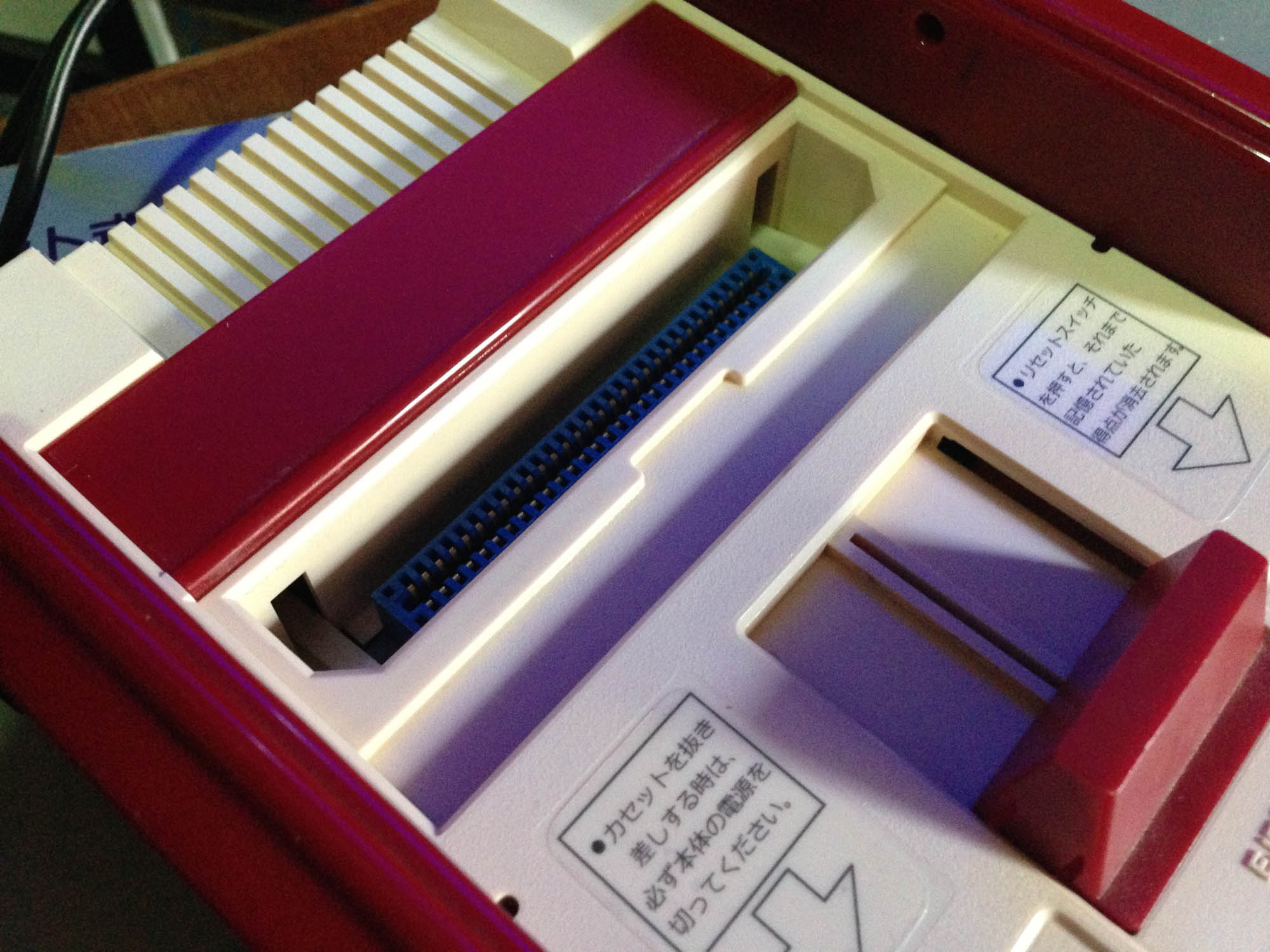
It’s an original model of the Family Computer from either 1983 or possibly early 1984.

SquareFami_2

It features square ‘squishy’ rubber buttons for A and B on the controllers, much like the start and select buttons, and the action buttons on an early Game & Watch.

SquareFami_3

The other difference of note is a shiny finish on the bottom, compared to the textured finish of all later models.

SquareFami_5

I’ve done some restoration and cleaning including a peroxide treatment, and it turns out after the yellowing is removed, the console itself is a slightly different colour to other Famicoms, it’s got a slight red tinge. This solves the mystery of the reddish Famicom on the front of all Famicom boxes not matching the whiteness of later models – they changed the plastic around the time of the button change, but didn’t update the picture.

SquareFami_12

As far as I can tell, the early models didn’t feature an expansion port cover or arrow sticker on the front right – hence them not featuring on the box either. So these are not ‘missing’ here, they were never there.

Nintendo recalled all early consoles because of a bug that could cause it to crash, and because the square squishy buttons damaged easily and could get caught on the corners. After playing a few games with these controllers for a few minutes, they’re quite solid, but definitely inferior as buttons the the hard round ones with membrane switch that replaced them (Nintendo also phased out this button style in later Game & Watch releases. They have a long travel distance, and while they work fine for holding or pressing sporadically, if you have a game that requires hitting a button in quick succession (e.g. a beat em up), it feels ‘slow’ as you have to do a more substantial press each time.

SquareFami_6

The manual has square buttons featured as well, so this set is all-original.

SquareFami_7

Here are the three generations of original Famiom. Square button, round button, and round button with Famicom Family ‘FF’ logo. Note the slightly different colors of plastic, my second gen Famicom is the only one I would actually call ‘white’, it makes the ‘normal’ beige colour one on the right look yellow.

SquareFami_X1
Intesrtingly the console box was never updated to feature the ‘FF’ logo.

A Family Computer portrait.SquareFami_X2

SquareFami_8  SquareFami_9 SquareFami_10  SquareFami_11

How to play NTSC-J RF-only consoles on PAL televisions

Sometimes it’s difficult being a fan of Japanese games when living outside of Japan. If you’re in a PAL country, older RF-only NTSC-J consoles cannot ever display properly on PAL screens. You could possibly tune in a fuzzy black and white picture with no sound, at best. Even if your TV was NTSC compatible via other inputs (eg composite), it is  unlikely to support NTSC over RF.

You can mod most RF-only systems to output composite video or better, but personally I prefer  not to mod rarer or older consoles such as the SG-1000, Color TV Game 6, or some of my original Famicoms.

No modding for you!
No modding for you!

The traditional method was to use an NTSC-J compatible VCR which takes in the RF signal and outputs in PAL composite, but they’re getting harder to come by, are cumbersome, and you also end up with additional artifacting from the composite signal itself.

So here is a cheap solution, a $20 NTSC RF to VGA box – essentially designed as an external analogue NTSC TV capture card. It takes in RF (or composite via side inputs) and outputs in VGA plus 3.5mm stereo jack for audio, with various scaling options.

RF_4231  RF_4234

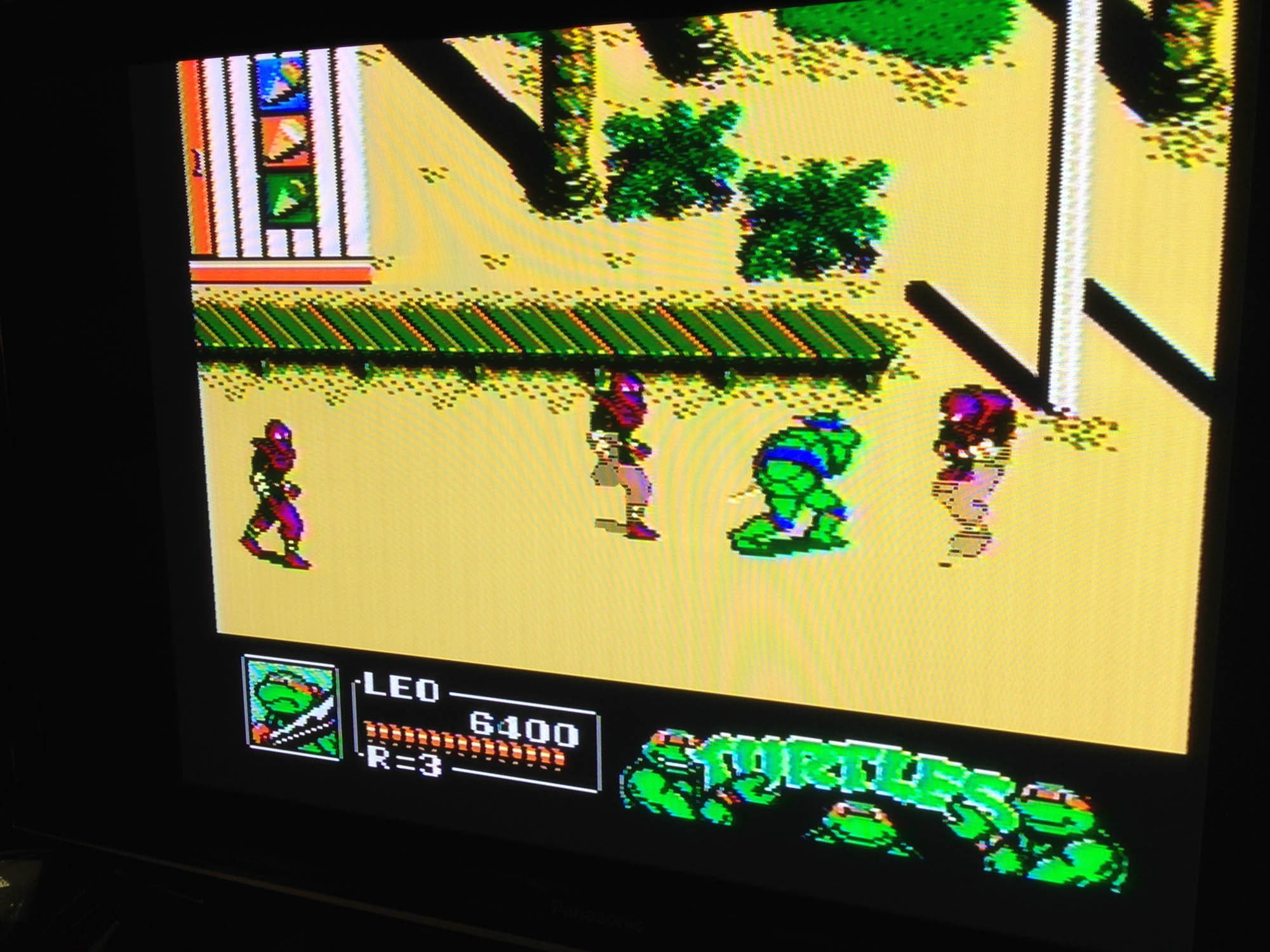
It can tune in these older consoles, and output via VGA, and the results are much better than I expected. The scaling, for what it can do with a fuzzy RF image, is quite solid. Options are selectable via an on-screen menu, and it even comes with a remote control.

RFTurtles_4203

And here are the results, Turtles 2 on on original Famicom to a 1080p Panasonic plasma.

RFTurtles_4204

RFTurtles_4205
The distortion lines are just from photographing the TV, it’s actually quite clean.

I’ve made a video of it running here:

The downside is that the tuner is NTSC-U, so still not 100% compatible with all Japanese consoles. I couldn’t get the SG-1000 working perfectly, the colours were off. However the Color TV Game 6 worked great, as did two different Famicoms, and a Super Famicom via RF.

It seems to have particular trouble getting sync with primarily plain background games. It eventually clicks and then stays in sync, but this can take a couple of minutes. However, in all these cases, sound is pretty much perfect the whole time.

Overall, it’s a pretty cheap solution to at least test RF consoles, and good enough to play many!

Update: I’ve since gotten a new TV which has no VGA input, but which has an international analogue tuner, so I no longer need or can use this box, but will hang onto it for possible future usages.

Sega SG-1000 (エスジー・セン)

Following my post about the first Nintendo console, here is the first Sega console.

It was in 1983 that this website’s co-namesake entered the home video game market, with their first machine, the Sega SG-1000.SG1000_4408

Released the same month as the Famicom (some sources claim the same day), it was a generation behind it in technology and design, featuring performance equivalent to the ColecoVision and first generation MSX. Sega couldn’t have predicted hurricane Famicom was about to redefine video games.

SG1000_4409

It plays Atari-style tall cassettes (cartridges), and features and Atari style joystick which is tethered  to the left of the console.

SG1000_4411

The back features a port to attach a keyboard. ‘Home computer’ versions of the hardware with the keyboard integrated were released as the Sega SC-3000.

SG1000_4416

It can also play Sega My Card software (like Dragon Wang here) with the ‘Card Catcher’ adapter, which was released to coincide with the launch of the SG-1000 II a year later.

SG1000_4417

About that SJ-200 joystick – it’s pretty awful. Very similar in responsiveness to an original Atari VCS joystick, but with a worse design. Both the joystick and buttons are stiff and unresponsive, even in a perfectly working controller. Inside it uses a primitive bending metal ‘leaf connector’ system, which was cheap but no substitute for the microswitches in arcade joysticks, or the innovative rubber membrane system Nintendo utilised in its Game & Watch series and brought to the Famicom.

SG1000_4413

On the right of the console there’s a standard Sega controller connector plug, which unfortunately is only for player 2. Sega actually released an adapter that allowed you to open the console and replace the player 1 SJ-200 with another controller port, but it’s apparently impossible to find. I might try and make up a home-made one to use Mark III controllers.

SG1000_9

Size-wise it’s comparable to a Mark III, and deceptively flat.

SG1000_4426  SG1000_4429

SG1000_4423

Output is RF-only, which means a classic fuzzy picture, if you can even tune it in (depending on where you live).

SG1000_5
The Konami game ‘High School Graffiti: Mikie’ where you play as a teen heart throb, to the tune of Beatles classics.

It’s a pretty cool collector piece, but due to the joystick and RF-only output is not the best choice to actually play on. The Mark III is fully backward compatible with SG-1000 games, has the card slot built in, and (with a bit of ingenuity) has very nice RGB graphics output.


Nintendo Color-TV Game 6 (カラー テレビゲーム6)

Do you think Nintendo started in home video gaming with the Famicom? The Game & Watch?

 80sNintendo_2040 80sNintendo_2053

It actually all started in 1977 with this, the Color-TV Game 6.CTVG6_7199

Pre-dating the Famicom by six years, The Color-TV Game 6 was a Pong clone, offering six variations on the basic light tennis formula. Above is the first edition, CTG-6S, which came in a creamy white colour. Subsequent releases were orange, below right is the most common variant, the CTV-6V.

CTVG6_7201

You can play a classic Pong type game, plus variations with half sized paddles, and a mode with four paddles.

CTV6_8 CTV6_9

It runs off six C batteries, and connects via RF as per all consoles of the era.

CTV6_7 CTV6_11

CTVG6_7213

The orange re-releases also added the ability to use an external power adapter.

CTVG6_7206

The orange ones also had improved dials. They rotate more smoothly, have less ‘give’ before they star registering, and stop rotating when your paddle is off the screen. CTG-6S dials just keep rotating, and your paddle comes back from the top of the screen after moving off the bottom, and vice versa.

CTVG6_7203

CTVG6_7208
The manuals of these two variants.

It’s pretty primitive but works perfectly 38 years later. The simple circuitry is pretty sturdy and will likely outlast most consoles easily.

CTV6_5

It was followed up by the Color TV-Game 15 which featured more pong versions, Color TV-Game Racing which played a car game, Color TV-Game Block Breaker which was a Breakout clone, the Computer TV-Game which played Othello, and finally the Family Computer.

But it all started here.

CTVG6_7195
This one is still in the original shipping box.

CTVG6_7196

CTVG6_7197

CTVG6_7198

CTVG6_7209